
Sticker styles
Every MochiStamp set is drawn in one of 8 styles. Here each style is shown with a different character so you can compare them side by side. Open a style to see 16 samples from two characters, along with tips for making stickers in that style.
 DoodleLoose doodles in quick marker lines
 2D chibiBig heads and bold expressions in 2D
 3D cartoonSoft 3D like an animated film
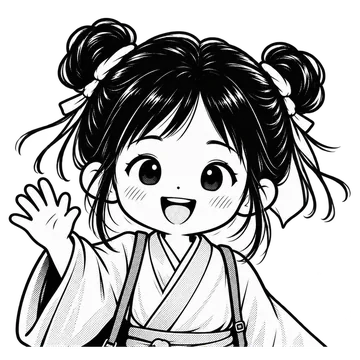 B&W mangaBlack-and-white manga with screentone
 CrayonWarm crayon and colored-pencil drawing
 WatercolorGentle watercolor with soft bleeds
 Retro pixelPixel art like a retro game
 ClayHandmade clay in 3D
Tips
- Choose by character: animals and mascots like rabbits and dogs look cute in every style. Human characters work best in 2D chibi or B&W manga, where hairstyles and clothes come through clearly in the lines. Go retro pixel for a game feel, or 3D cartoon and clay for a plush, rounded look.
- Choose by who you send to: for everyday chats with friends and family, the loose feel of doodle and crayon fits right in. For work messages and polite sets, colorless B&W manga or soft watercolor looks calmer. For a bright, upbeat set, the vivid colors of 2D chibi stand out.
- Choose by how much text: every style can carry text. When every text on a sheet is 3 characters or fewer (8 letters in English), the sheet is drawn in big lettering automatically, so short texts read well in any style. B&W manga draws text in black and white too, so pick another style if you want text to stand out by color. Watercolor, 3D cartoon and clay put the picture first and suit sets with no text.
FAQ
Can I change the style partway through?
Each set is drawn in the style you chose at the start, and redrawing a single sticker uses the same style. To try another style, make a new set with the same character description. “Create again with these settings” in “My stickers” fills in the description and texts for you.
Can I mix two styles in one set?
No. A set uses one style, and all 8 stickers on a sheet are drawn in the same touch. To compare two styles, make two sets with the same character description.
Can I use the sample settings as they are?
Yes. On each style page, tap “Make one like this” and the sample’s character description and style are filled into the creator. The samples are drawn without text, but turn on “Write text on stickers” to make a set with text for the same character. You can change the texts and the number of stickers from there.
Related pages
Turn your character into LINE stickers today.
With MochiStamp you write one line about your character, and get a set of 8 to 40 stickers drawn and packed into this same ZIP. Sign in with Google for 20 free.
Make stickers